At a glance
Is interactive demo software the right buy?
Yes, if buyers need to try a workflow before they talk to you. A video shows the workflow and a screenshot shows one screen. An interactive demo lets the buyer click through every step at their own pace, from a link or right on your site. If the guidance has to run inside your signed-in product, you want an in-app tour instead. Ready for names? Compare interactive demo tools.
| Format | What the buyer does | Best when | What happens when your UI changes |
|---|---|---|---|
| Interactive demo | Clicks through the real steps at their own pace | The question is "how does this work?" | You edit the steps that changed |
| Product video | Watches a fixed sequence | The story matters more than the steps | You re-record and re-edit the video |
| Annotated screenshots | Scrolls past still screens | One screen answers the question | You retake the affected screenshots |
| In-app product tour | Follows prompts inside your signed-in product | The viewer already has an account | Your team updates the tour with the release |
Research and trust
Five of those seven publish a free plan. Three price paid plans per seat or per creator, and four charge a flat or bundled price. So put the pricing model on your checklist next to features, because it decides what you pay once a second person starts building demos. Considering a specific vendor? Start from all Arclet comparisons.
Why teams pick Arclet for interactive demos
Arclet gets one real workflow in front of buyers without a sales call. Install the Chrome extension, click through your product once, and Arclet turns each click into a step. Rewrite the tooltips, then publish. Buyers open a public link or an embed on your site without logging in.
Free covers one creator and five published demos with unlimited views. Starter is $29 a month, or $25 billed annually, for unlimited demos, blur and zoom, and no Arclet branding. See Arclet pricing.
Record the workflow once
Open the extension, press record, and use your product the way a buyer would. Each click becomes a step you can edit, so nobody rebuilds screens by hand.
Fix a step without re-recording
Rewrite a tooltip, reorder steps, or remove one you don't need. When one screen of your UI changes, you edit that step instead of starting over.
See how to edit a demo step in Arclet.
Open a demo from the library, play it, then change a sentence in the editor and see the demo update. The recording starts from a demo that's already recorded, so it doesn't show the Chrome extension capturing.
Put the demo where the question comes up
Send a public link in a follow-up email, or embed the demo on a pricing page or a help article. Viewers don't need an Arclet account.
See how to share and embed an Arclet demo.
Choose who can open the demo, then copy a public link or the embed code. The share panel copies the link rather than displaying it, so the recording ends before a visible URL.
See which demos people finish
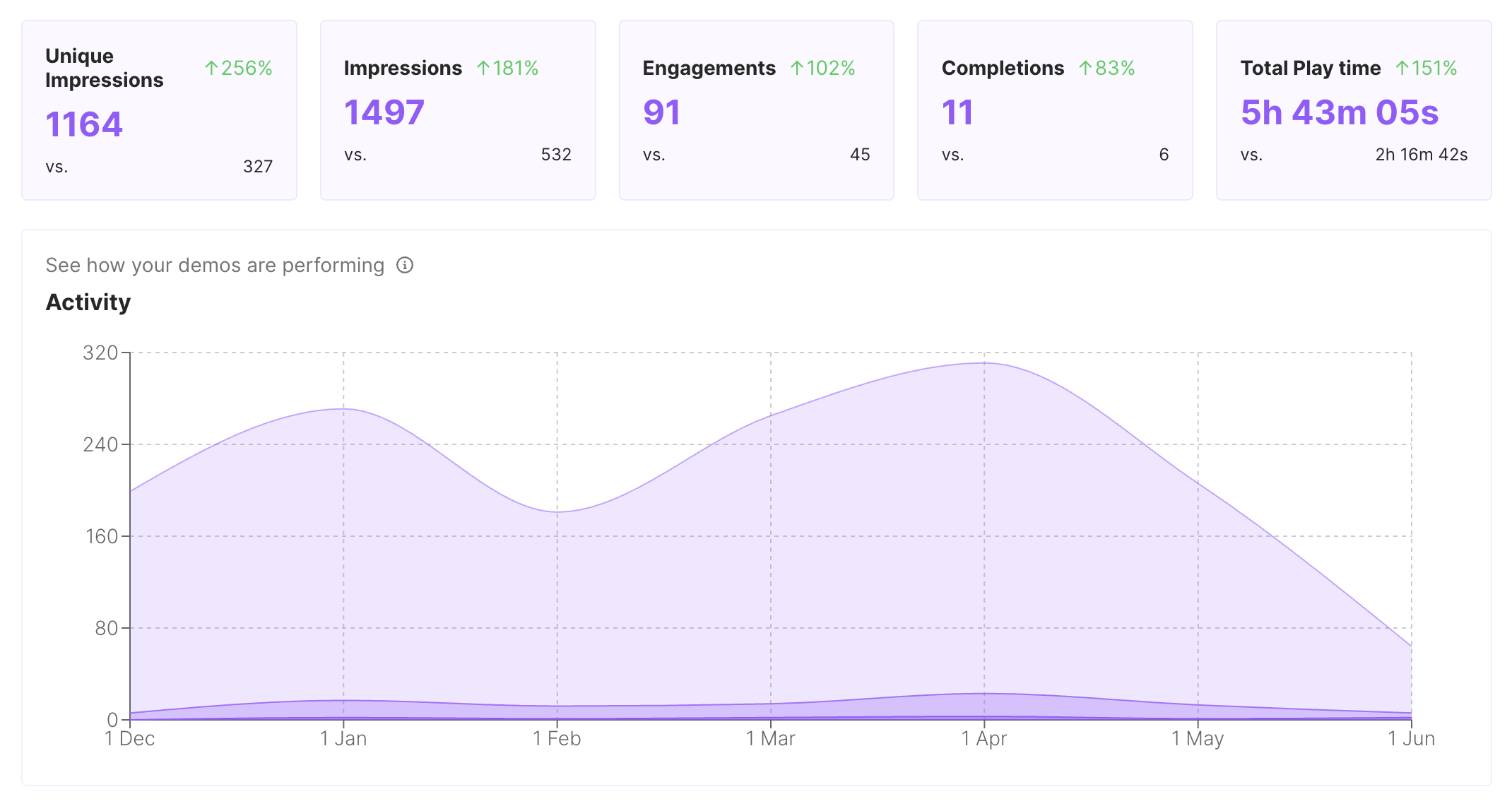
Every plan shows views, plays, and completions for each demo, so you know which one to fix first. Starter adds step-level analytics.
When another format fits better
An interactive demo is the wrong buy when one of these describes your problem.
The story matters more than the clicks
A launch announcement or a founder walkthrough lands better as a video. Buyers watch it once and nobody needs to click anything.
One screen answers the question
If the buyer only needs to see what a report looks like, an annotated screenshot is faster to make and cheaper to keep current.
Customers search for the answer
A help article with numbered steps is searchable and quick to update. Link a demo from it when the steps are hard to follow in text.
The guidance runs inside your signed-in product
Onboarding checklists that react to a user's account need an in-app tour tool. Arclet makes demos you share outside your product, so it isn't that tool. Compare external demos with in-app tours.
Choose by the job to be done
Teams buy interactive demo software for one of three jobs. Pick yours before you shortlist. Still weighing formats? Read guided demos versus HTML demos.
Let prospects try the product before a call
Put a demo of the workflow buyers ask about most on your homepage or pricing page. The prospect clicks through it tonight, and your first call starts from their questions instead of a tour.
Help a buyer sell you internally
Your champion has to explain the product to a boss who wasn't on the call. Send the demo so they can click through the same workflow. See product demo software for the sales call.
Answer the question support hears every week
Record that workflow once and link it from the help article and the ticket reply. See SaaS demo software across the customer lifecycle.