Free toolNo signup · Nothing you type is sent
SOP generator: write a procedure people can follow
Choose one of five templates, rewrite it for your team, and see the finished document beside the form. Copy it as Markdown or HTML, or print it. What you type stays in your browser tab.
- 5 ready templates
- Copy as Markdown or HTML
- Print or save as PDF
Try it now
Pick a template. Edit the steps. Copy or print.
Show your product as an interactive demo people can click through, free to get started.
Start for freeHow it works
Write a standard operating procedure
Choose one of five templates, rewrite it for your team, and see the finished document beside the form. Copy it as Markdown or HTML, or print it. What you type stays in your browser tab.
Step 1
Pick a template
Choose Restaurant opening, Clinic front-desk intake, Warehouse receiving, Agency client onboarding or SaaS support escalation under Template. Each one fills every field with a realistic starting point.
Step 2
Rewrite it for your team
Change the Title, Purpose, Scope and Owner, then edit the Roles, Steps and Checks. Use Add step, Remove and the Up and Down buttons to match how the work really happens.
Step 3
Copy or print it
Fill in the Revision log, then choose Copy Markdown, Copy HTML or Print. Print opens your browser print dialog, where you can also save the page as a PDF.
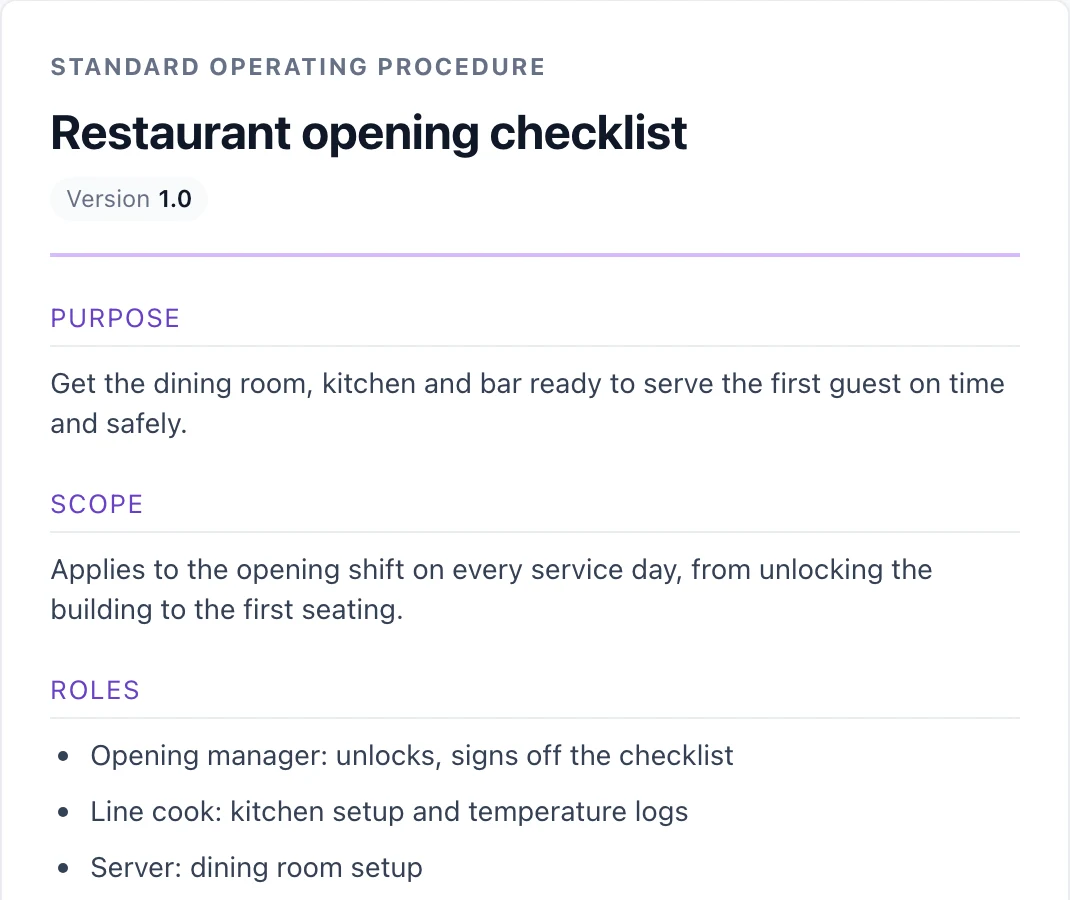
The template the tool opens with
The tool opens on the Restaurant opening template. These are some of the fields it starts with, which you can replace.
- Title
- Restaurant opening checklist
- Step 2
- Check the walk-in fridge and freezer temperatures and write them in the temperature log.
- Check 1
- Both temperature readings are logged and in range.
How a standard operating procedure is put together
What an SOP is for
A standard operating procedure writes down how a recurring task is done so that two different people do it the same way. It is most useful for work that is easy to get slightly wrong, work that new people take over, and work where a missed step has a cost.
It is not a policy and not a training course. A policy says what must be true. An SOP says what to do, in order, to make it true.
What each section does
The title names the task in plain words, so someone searching a shared drive finds it. Purpose says why the procedure exists, in a sentence or two. Scope says where it applies and where it stops, which settles most arguments about whether a case is covered.
Owner is one named person or role who keeps the document current. Roles list who takes part and what each person is responsible for. Procedure holds the numbered steps. Checks are the conditions that show the work was done correctly. The revision log records who changed the document, when and why, so readers can tell whether their copy is current.
How to write a testable step
A good step starts with a verb and names one action. "Check the walk-in fridge temperature and write it in the log" can be done and checked. "Make sure the kitchen is ready" cannot, because two people will read it differently.
Test each step by handing it to someone who has never done the task. If they would have to ask a question, the step is missing a detail: which system, which form, which threshold, or who to tell. Put that detail in the step, not in the head of whoever wrote it.
Keep one action per step. If a step contains the word "and" joining two separate tasks, split it. Short steps are easier to follow with your hands full and easier to mark off in a checklist.
Write checks you can answer yes or no
Checks sit after the steps and ask whether the outcome is right. "The signed delivery note is filed" is a yes or no answer. "The delivery was handled well" is an opinion. When a check keeps failing, the usual cause is a step that is unclear or missing, so fix the step rather than adding another check.
When a step needs a picture or a click-through
Some steps are hard to describe. Finding a setting in a settings page, choosing the right option in a form, or spotting the correct button are easier to show than to explain. A screenshot with the right area marked removes a paragraph of directions.
For work that happens inside software, a short interactive walkthrough goes further, because the reader can click through the real sequence at their own pace. Use one for the steps people get wrong most often and keep text for the rest.
See how to edit and personalize an interactive demoKeep it alive
An SOP that nobody updates gets ignored. Name the owner, put a review date in the revision log, and change the document the same day the real process changes. Version numbers can be simple: 1.0 for the first release, 1.1 for a small fix, 2.0 when the process itself changes.
The templates here are starting points, not finished documents. Replace anything that does not match how your team works, and have someone who does the task read it before you rely on it. The clinic template covers front-desk intake only. It contains no clinical guidance and should not be used as a medical procedure.
Frequently asked questions
Everything you need to know to get started today.
Screenshots show a moment. Demos show the whole flow.
Record a workflow once in your browser and share a demo people can click through.